


When the COVID-19 pandemic hit the United States with full force back in 2020, the Remote Workforce became the norm. However, there were still employees that had to work on site, especially if their employer was deemed to be an “essential business”. Bridging the gap between the onsite and remote staff was always a problem.
But now that the Hybrid Workforce model is starting to gain in popularity, this divide continues to exist between remote and on-site workers.
The good news is that Microsoft has come up with a new tool, called “Loop” to bring employees into one central forum, no matter where they may be located in the world.
What Is Loop?
Microsoft defines Loop as follows:
“It is about people—people who want to create together with ease, no matter where they are or what tools they use. It’s a transformative co-creation experience that brings together teams, content, and tasks across your tools and devices.”
(SOURCE: 1).
In other words, Loop can be viewed as a centralized hub and even a repository where all of your employees can store files, and collaborate together on them in a real time basis. It contains major components, which are reviewed in the next section.
The Functionalities Of Loop
The following are the major facets of this exciting app:
- A Single Workspace:
No matter how small or large your business might be, there is a good chance that you are making use of freelancers or contractors. But trying to get them to work together in unison can be problematic, especially if they are in different time zones or geographic areas. This is where the “Single Workspace” feature comes into play. It allows your entire team to store their work in one central location in M365. But even better, it allows you, the business owner or project manager, to view any edits or changes made to the files as they happen. Even if you are offline, you can still get email and/or text messages notifying you when a change has been made, or if a new file has been uploaded, or even if one has been deleted. But sometimes, although you may have a grand idea for a project, it can be hard to get the ball rolling on it. With the expected integration of Copilot, new ideas or content can be presented to you and your team to get started in the best way possible. An example of a workspace is illustrated below:

(SOURCE: 1).
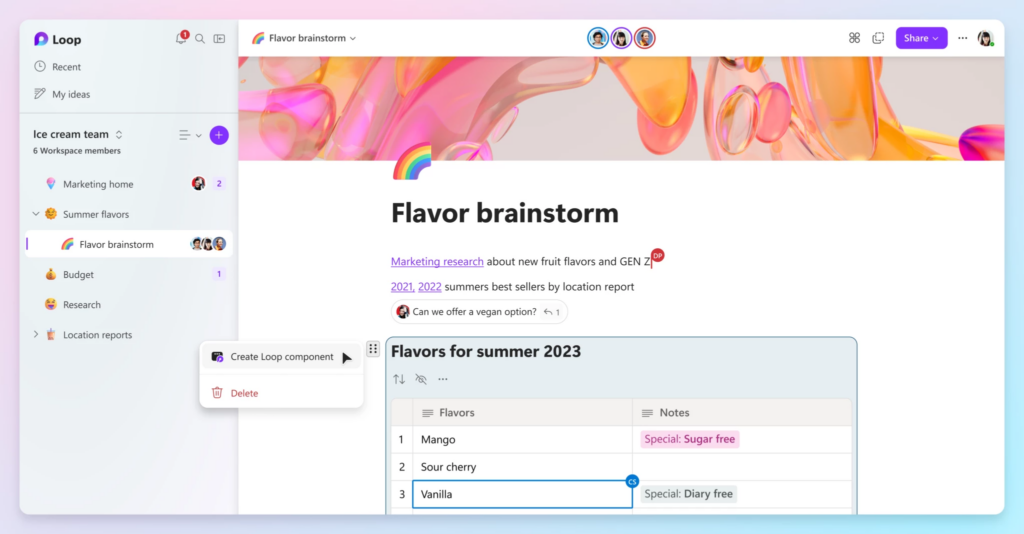
- The Component:
If you are running a creative or mobile app development team, there will be times when you will want to keep your clients informed as to the progress that is being made on their project. One of the best ways to do this is via screenshots. But, if the project becomes large and complex, it can be difficult to decide on what to showcase. This is where the “Component” functionality comes into play. With this, you can break down the major milestones of the project into separate views. But keep in mind that these are much more powerful than just the simple screenshot. The “Component” is an actual, real-time chunk of the entire project, and can interact with other pieces on a real time basis, in case your client wants to see what is relevant to what you are discussing with them. The “Component” can be used across any M365 app, Teams, and even Outlook. An example of this is illustrated below:
(SOURCE: 1).
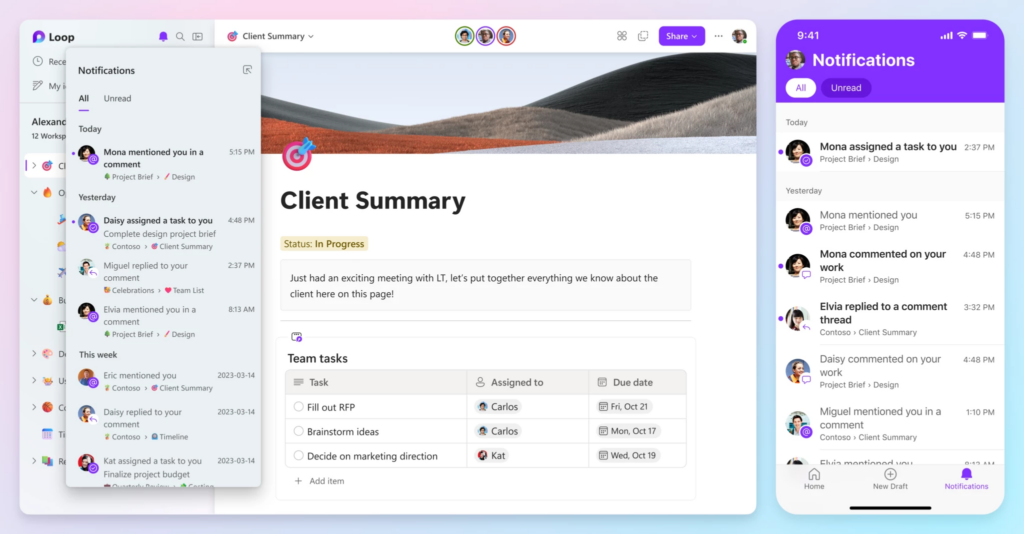
- The Page:
Although Loop acts as a central repository, it takes one step further. You can create what is known as a “Page”. This is where all of your team members or employees can see the major aspects of the project as they are being done from one central viewing source. Best of all, it can integrate with all means of communications, such as text, email, chat, and instant message so that any communications on the project can happen. An example of this is illustrated below:
(SOURCE: 1).
Conclusions
Loop is a very powerful tool to use, and it is important that you use it in the most effective way for your business. Contact us today to help you out with this. Also as mentioned, there will be a strong integration between Copilot and Loop, so stay tuned for a future article on this.
Sources
- https://www.microsoft.com/en-us/microsoft-365/blog/2023/03/22/new-microsoft-loop-app-is-built-for-modern-co-creation/


